Overview
What Is WP-FB AutoConnect?
The simple concept behind WP-FB AutoConnect is to offer an easy-to-use widget that lets readers login to your blog with either their Facebook account or local Wordpress credentials. Although many "Facebook Connect" plugins do exist, most of them are either overly complex and difficult to customize, or fail to provide a seamless experience for new visitors. I wrote this plugin to provide what the others didn't:
- Full support for both Wordpress and Buddypress.
- No user interaction is required - the login process is transparent to new and returning users alike.
- Existing users who connect with FB retain the same local user accounts as before.
- New visitors will be given new user accounts, which can be retained even if you remove the plugin.
- Facebook profile pictures can be used as avatars, even on pre-existing comments.
- No contact with the Facebook API after the login completes - so no slow pageloads.
- No 3rd party services: your site talks directly to Facebook, through an app created and owned by you.
- Won't bloat your database with duplicate user accounts, extra fields, or unnecessary complications.
- Custom logging options can notify you whenever someone connects with Facebook.
- A powerful set of hooks and filters allow developers to easily tailor the login process to their personal needs: redirect to a custom page, fill xProfile data with information from Facebook, setup permissions based on social connections, and more.
- Fully HTML/CSS valid.
WP-FB AutoConnect Premium
To address the needs of more advanced users, I've created an additional Premium add-on which extends the functionality of the free WP-FB AutoConnect plugin. This add-on currently provides the following:
Premium Features:
- MultiSite Support (Click for more info)
Close
The free plugin is not aware of users registered on other sites in your WPMU installation, which can result in problems i.e. if someone tries to register on more than one site. The Premium version will actively detect and handle existing users across all your sites. - Shortcode Support (Click for more info)
Close
While the free plugin lets you place Facebook login buttons in your widget areas, the Premium addon's shortcode support makes it easy to place them in your post or page content as well - without the need for any custom PHP. - Require access to user's real email address (Click for more info)
Close(new!)
Although the free plugin allows you to ask the user for their email, they can still refuse to share it in the Facebook login popup. This premium option performs additional checks to require that they give you access to their address, before they're permitted to login. Users who deny this permission can be shown a customizeable message (i.e. asking them to login again). - Use image-based login buttons (Click for more info)
Close
While the free plugin uses xfbml to render its login buttons, the Premium addon allows the use of standard images as well. Image-based buttons have the advantage of being fully CSS-styleable, and of loading right away - just like any other page element. - Cache Facebook avatars to your server (Click for more info)
Close
This will make a local copy of profile pictures, so they'll always load reliably, even when Facebook's servers lag. No more broken avatars, ever. - Allow users & admins to manually disassociate user accounts from Facebook
- Auto-fill BuddyPress X-Profile fields with information from Facebook
- Announce Facebook logins on the BuddyPress Activity Stream
- Show an AJAX spinner to indicate load-in-progress after clicking the Login button
- Customize the login button's size and text (handy for localizing to another language)
- Add a Facebook button to the comment form, login form, registration form, and WPMU signup form
- Customize the Redirect URL for first-time visitors ("Welcome" page), returning visitors ("Welcome Back" page), and logged-out visitors ("Come back soon" page)
- Restrict autoregistration to Facebook friends, Facebook fans, explicitly invited users (via Secure Invites), everyone, or no one
- Send a customizable welcome mail to autoregistered users (with their generated login and password)
- Customize the role assigned to autoregistered users
- Request specific avatar dimensions from Facebook (i.e. for high-res themes) (new!)
- Silently handle "double-logins" (Click for more info)
Close
If a visitor opens two browser windows, logs into one, then logs into the other, the security nonce check will fail. The free version of the plugin detects and reports this, giving the visitor a link to their desired redirect page. The premium version will handle it transparently: to visitors, it'll look like the page has just been refreshed and they're now logged in. - Show links to connected users' Facebook profiles in the "Users" admin page
- Customize all visible text (Click for more info)
- Show/Hide any of the Widget's links, checkboxes, or textfields (Click for more info)
Close
You can show or hide:- The User/Pass fields (leaving Facebook as the only way to login)
- The 'Register' link (only applicable if registration is enabled on the site/network)
- The 'Remember' tickbox
- The 'Edit Profile' link
- The 'Forgot Password' link
- Show the user's avatar next to their username (when logged in)
- Point the 'Edit Profile' link to the current user's BuddyPress profile (rather than Wordpress)
- Point the "Forgot Password" link to a custom URL of your choosing
- Simultaneously logout of Facebook and the local blog
Important: Before making a purchase, please be sure to install and test the free plugin to confirm that it works for you; if the free version works, so will the premium:
Buy WP-FB-AutoConnect Premium (Single Domain) - $29.99
Buy WP-FB-AutoConnect Premium (Multiple Domain) - $69.99
To install it, first setup the free version of WP-FB AutoConnect and then simply drop the purchased "WP-FB-AutoConnect-Premium.php" script into your plugins directory. This will automatically enable the premium features in your admin panel, and you may continue to update the core plugin as usual.
Screenshots
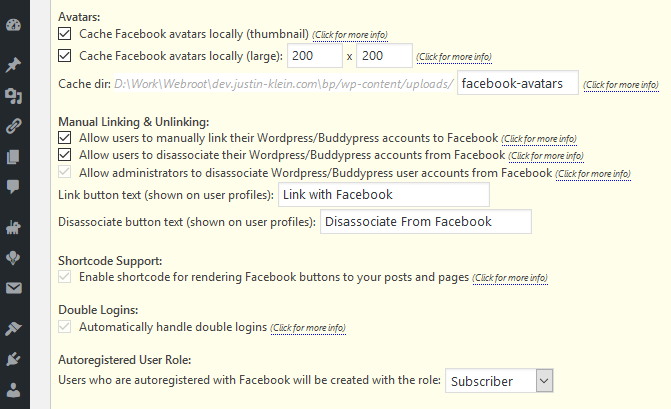
Here are some screenshots of the plugin; click each one for a larger view and description:




Instructions
- Download the latest plugin from here, unzip it, and upload the extracted files to your plugins directory.
- Login to your Wordpress admin panel and activate the plugin.
- Navigate to Settings -> WP-FB AutoConn.
- Follow the steps shown in the admin panel to create & register your Facebook app.
- If you're using BuddyPress, a Facebook button will now automatically appear in its built-in login widget. Otherwise, navigate to Appearance -> Widgets and add the WP-FB AutoConnect widget to your sidebar.
Customizing
How it Works
Before getting into any advanced customization, you should have a general understanding of how the login process works. When a user clicks the login button, a Facebook form pops up, they fill in their info, it closes, and a javascript callback function redirects them to _process_login.php. This is the heart of the plugin. Here's what it does:- Access the User's Facebook account and get their uid (userID)
- Search for existing WP users tagged with this visitor's Facebook uid; whenever someone successfully connects, the plugin tags them with usermeta so it can quickly match them to their WP user account on subsequent logins. If found, this is the existing WP user we'll login.
- If nobody is found via usermeta, we search all existing users for someone with the same email address as the connecting FB member (assuming you've opted to ask them for their email). If found, this is the existing WP user we'll login.
- If nobody is found via meta or email, we assume the connecting user is a first-time visitor. We auto-create an account for them and log them in.
- Redirect the user to their previous page.
Hooks & Filters
During the login process, a number of hooks and filters provide an easy way for programmers to customize the script's behavior as needed:- Hook wpfb_prelogin runs at the very start of the login script, allowing you to perform custom actions before connecting to Facebook.
- Hook wpfb_connect runs after pulling all the profile info from Facebook, but before searching for a local Wordpress user and deciding if this is a 'returning login' or 'automatic registration.'
- Filter wpfb_insert_user is applied to userdata just before autoregistering an account, allowing you to customize new users without affecting existing ones.
- Hook wpfb_inserted_user is run after the user has been autoregistered. It receives the new user's ID, letting you add or manipulate its meta.
- Hook wpfb_existing_user runs before logging in an existing (i.e. not autoregistered) user.
- Hook wpfb_login runs just before the login process finishes, receiving the user's Wordpress uid, their Facebook uid, and a Facebook access token. This allows you to access and utilize social information about your visitors; see the examples below for more detailed instructions.
- Hook wpfb_add_to_form allows you to insert html into the <form> responsible for sending the user to _process_login.php. This is handy if you want to forward additional data for use during the login process.
- Hook wpfb_add_to_js lets you insert additional javascript to be executed before submitting the <form> that sends the user to _process_login.php.
- Hook wpfb_add_to_asyncinit lets you insert additional javascript after the Facebook API initializes.
- Filter wpfb_extended_permissions lets you modify the extended permissions that Facebook will prompt for. The complete list of available permissions is documented here.
- Hook wpfb_after_button lets you output custom html immediately after the Login with Facebook button.
Examples
The hook wpfb_login receives an array of arguments, formatted like this:- $args['WP_ID']: The local Wordpress user ID
- $args['FB_ID']: The Facebook user ID
- $args['access_token']: A Facebook access token for the connecting user
add_action('wpfb_login', 'add_to_friends');
function add_to_friends($arg)
{
  $myUID = '123456';
  $newUID= $arg['FB_ID'];
  $rsGrpID = 15;
  $friends = jfb_api_get("https://graph.facebook.com/me/friends/".$myUID
                        ."?access_token=".$arg['access_token']);
  if( (count($friends['data']) > 0) )
    ScoperAdminLib::add_group_user($rsGrpID, $arg['WP_ID']);
}
As you've probably guessed, jfb_api_get() is a simple convenience function I've provided to GET from a Facebook Graph URL; jfb_api_post() is also available. For information on the Graph API and how to pull content from Facebook, refer to the documentation here.The following is a slightly more advanced example of how you might use wpfb_add_to_js and wpfb_add_to_form to forward some custom data for use during the login process:
//Add a POST variable to be sent through to _process_login.php
add_action('wpfb_add_to_form', 'nb_connect_add_to_form');
function nb_connect_add_to_form(){
  echo '<input type="hidden" name="cstm" id="cstm" value="unset" />';
}

//Before the form is submitted, use JS to set the field dynamically from a textbox
add_action('wpfb_add_to_js', 'nb_connect_add_to_js');
function nb_connect_add_to_js(){
  echo "document.getElementById('cstm').value = document.getElementById('t').value";
}

//When the user connects, insert the data into their BP xprofile.
add_action('wpfb_inserted_user', 'nb_connect_add_profiledata');
function nb_connect_add_profiledata($args){
  global $_POST;
  if( !function_exists('xprofile_set_field_data') ) return;
  xprofile_set_field_data('my_profile_field', $args['WP_ID'], $_POST['cstm']);
}
Finally, let's say you're a Premium customer who wants to map some Facebook user data to your BuddyPress XProfile, but the data you're after isn't one of the fields supported by default. The premium addon provides three filters for this purpose, so you can add support for mapping any information you like:
add_filter('wpfb_xprofile_allowed_mappings', 'jfb_custom_addmappings');
function jfb_custom_addmappings($allowed_mappings){
  $allowed_mappings['textbox']['music'] = 'Music*';
  $allowed_mappings['textarea']['music'] = 'Music*';
  return $allowed_mappings;
}

add_filter('wpfb_xprofile_fields_requiring_perms', 'jfb_custom_fieldperms');
function jfb_custom_fieldperms($fields_requiring_perms){
  $fields_requiring_perms['music'] = 'user_likes';
  return $fields_requiring_perms;
}

add_filter('wpfb_xprofile_fields_received', 'jfb_custom_processfields');
function jfb_custom_processfields($fb){
  if(isset($fb['music']) && is_array($fb['music']) && is_array($fb['music']['data'])){
      $arr = array();
      foreach($fb['music']['data'] as $item) array_push($arr, $item['name']);
      $fb['music'] = implode(",", $arr);
  }
  return $fb;
}
Access Tokens
This plugin was intentionally designed only to interact with Facebook during login (see the 7th bullet under the list of features above). As such, access tokens obtained during the login process are short-lived and expire after only an hour or two (see Facebook's documentation here). If you'd like to utilize them to fetch additional profile information or perform actions on the user's behalf, you should do so in one of the login-time hooks or filters listed above, but please note that attempting to store, extend, or re-use them at a later point is beyond the scope of this plugin's included features and of my support.Custom Login Buttons
The Premium addon provides options to insert Facebook login buttons to various locations around your site, including post/page content (via shortcode), login and registration pages, comment forms, and more. In most cases, this is the easiest way to output additional buttons.If you'd like to manually add a button elsewhere on your site, you may do so by calling the PHP function:
jfb_output_facebook_btn();Note however that this relies on two other functions which are normally auto-invoked by wp_footer, jfb_output_facebook_callback() and jfb_output_facebook_init(). If you end up with a nonfunctional button, most likely you're on a page that doesn't call wp_footer so you'll need to explicitly call one or both of these yourself.
FAQ
Click each FAQ to reveal its answer. Numbers may not be sequential as I remove old or outdated FAQs.3. The widget's layout looks weird.
This is a CSS issue - I've provided a basic stylesheet, but you probably need to tailor it a bit to match your theme.
8. What if my theme doesn't support Widgets?
The right answer: update your theme. It's *very* easy to support them, and they've been around for ages.
The wrong answer: <?php the_widget("Widget_LoginLogout", array('title' => 'Login')); ?>
9. I'm getting a 404 server error while trying to execute _process_login.php.
Your FTP client is probably set to upload files with the wrong permissions - try changing _process_login.php and the parent directory to 755. You should be able to access _process_login.php directly and have it say "Please do not access this script directly." If not, that means your server isn't executing the php at all (and it's a problem with your server configuration rather than the plugin).
10. I'm getting a 500 internal server error while trying to execute _process_login.php
In order to find the cause, you'll need to view your raw server error logs (contact your webhost if you don't know how). 9 out of 10 times it's because some necessary module (like cURL) is missing or disabled.
11. When I click the Login button a dialog comes up, but then nothing happens - it never logs in.
Most likely your page has other javscript errors that are causing it to fail; load it up with Firebug and see. Two common mistakes are:
14. When I click the "Login with Facebook" button, nothing happens - no popup dialog.- The Site URL you entered on Facebook doesn't match the base URL of your site. Note that http://example.com is not the same as http://www.example.com. Also make sure you've entered it correctly in Wordpress under Settings -> General.
- JQuery is not working properly on your site. This could be due to a corrupt Wordpress install, or an improperly-coded theme; Google is your best bet for a solution.
Most likely your page has other javascript errors that are causing it to stop executing before it reaches the login button. Load it up with Firebug and see. For information on how to use Firebug, please visit Firebug.com.
17. Whenever I try to login, I get stuck with "You must be logged in to Facebook to use this feature."
You've probably disabled third-party cookies in your browser. Facebook Connect requires cookies.
20. Whenever I try to connect, I get the error "Failed nonce check. Login aborted."
The "nonce" is a security feature builtin to Wordpress (see here), and not something I personally implemented. It's possible that something funky is going on with your cookies, or that a caching plugin is breaking this functionality. However, as I've never experienced the problem myself, and as nonces aren't specific to this plugin, I'm afraid I really can't tell you what your problem might be. If you simply can't figure it out and are desperate to get the plugin running, I've added a debug option to "DISABLE the nonce security check" - but note that I don't recommend using this as it will result in weakened security by skipping the nonce check entirely.
22. Can users who registered with this plugin also login manually (not via FB)? What's their password?
Yes; autoregistered users are the same as any other WP user. However, they'll need to login with Facebook once so they can edit their profile and set their own password. Alternatively, you can purchase the premium addon which can send a custom welcome message (with generated login & password) to autoregistered users.
23. I don't like the username/role/something about the autoregistered user accounts. Can you change it?
You're free to modify the userdata to anything you'd like via the filters documented above. For example, here's a simple filter you could use to make the autoregistered usernames be based on Facebook e-mail addresses:
24. "Login with Facebook" only appears as text, not a clickable button.
add_action('wpfb_insert_user', 'ex_username_to_email', 99, 2);
function ex_username_to_email( $user_data, $fbuser ){
  $user_data['user_login'] = $fbuser['email'];
  $user_data['user_nicename'] = sanitize_title($user_data['user_login']);
  return $user_data;
}
*Note: This is provided only as an example, and should not be used exactly as-is. The reason email-based usernames aren't one of the default plugin options is that there are situations which could result in invalid names (i.e. if the connecting user refuses access to their e-mail address). Please remember to error-check carefully, and to consider all possible corner-case scenarios.It's probably caused by one of:
27. Why can't users who've connected with Facebook change their avatars anymore?- Your theme isn't calling wp_footer. Try reverting to the default theme.
- You've got other Javascript errors on your page. See FAQ14.
- Make sure browser cookies are fully enabled, and/or try another browser (without any addins/extensions)
- If you're using a Facebook Social Plugin, try the iFrame version (rather than HTML5 or XFBML).
The option to use Facebook avatars cannot be overridden on a per-user basis. In other words, if enabled, all users who've connected with Facebook will see their profile picture rather than their Wordpress avatar.
30. Can I receive update notifications for the Premium addon? How do I perform the updates?
As of v28 (released 11/20/2012), the Premium addon will automatically check for updates and place a notice at the top of your admin panel whenever a new version becomes available. At that time, you may grab the latest version by accessing your purchase history on justin-klein.com/store.
31. I've downloaded and installed the Premium addon, but I still can't access its features.
WP-FB-AutoConnect-Premium.php goes in your plugins directory (i.e. wp-content/plugins/WP-FB-AutoConnect-Premium.php), not the WP-FB-AutoConnect directory (i.e. wp-content/plugins/wp-fb-autoconnect/WP-FB-AutoConnect-Premium.php). This is to prevent it from getting overwritten when you auto-update the core plugin.
33. I've downloaded the Premium addon, but installing it gives the error PCLZIP_ERR_BAD_FORMAT.
You're probably trying to install the addon from your Wordpress admin panel as though it were a plugin. As per the setup instructions above, the addon needs to be uploaded directly to the "wp-content/plugins" directory on your server. You can do this via FTP, or through your webhost's file manager.
35. It doesn't seem to work in so-and-so browser.
Please reconfirm any browser-specific issues on another computer before reporting them below; 99% of the time they're caused by something on your local system. Make sure you tell me you've done this when reporting a browser bug, or I'll just redirect you to this FAQ. Note that the plugin has been tested and confirmed working on all major browsers (including iOS and Android).
36. How can I modify the plugin to work a bit differently / How can I implement some not-included feature?
As this plugin is open-source, you're welcome to tinker and modify it as you like. However, I do not provide support on customizations beyond what's included with the plugin. If you need customizations that you can't implement on your own, I suggest hiring an experienced Wordpress developer to do so for you (i.e. from here or here). Note: asking me to tell you exactly what to add/modify is the same as asking me to do it myself.
37. Whenever someone tries to login, it says "Error: Failed to get the Facebook user session..."
This is virtually always due to conflicting plugins or themes. Some particularly common conflicts:
38. Why isn't my login widget showing the connected user's avatar?- Facebook plugins. Make sure any other Facebook plugins have been updated to OAuth2, and that they're configured to use the same AppID as this one. You cannot load more than one AppID on a given page.
- CDN plugins. Make sure to add an exception so this plugin's directory does not get copied to a CDN.
- Caching plugins. Some include CDN functionality (see above), or cause issues with cookies.
- Themes that have one or more of these features built-in.
The option to show an avatar is available via the Premium widget only. If you're already a Premium customer but aren't seeing an avatar, head over to Appearance->Widgets in your admin panel and make sure you're using "WP-FB-AutoConnect Premium" (not "WP-FB-AutoConnect Basic"), and that the "Show Avatar" option is enabled.
40. Imported Facebook avatars are too big / too small / too unpredictably-sized / not showing at all.
Facebook thumbnails are always 50x50, so if you're seeing something different (or nothing), your theme is probably calling the avatar function wrong. Try it out on the default theme. If you're intentionally showing the fullsize profile image but want to enforce consistent dimensions, you can do that with CSS.
44. When I try to "Connect" the admin panel, it says "Error: Failed to validate your App ID and Secret."
- If the error message also says "wp_remote_get() failed," it means your server can't establish an outbound connection to Facebook; you’ll need to get in touch with your webhost to address the issue with them. Perhaps they have i.e. overly aggressive firewall settings that are blocking the connection, or curl hasn’t been properly setup. But this error message means the plugin can’t reach Facebook at all, so something on your server is likely blocking the connection.
- Otherwise, it probably means you've changed your app's settings beyond what's listed in the instructions - try creating a new one from scratch, following the setup instructions exactly. You should be able to visit https://graph.facebook.com/<YourAppID> in a browser and have it show info about your app (like this). If it doesn't, something you changed is causing Facebook to block it.
I believe strongly in free and opensource software, which is why I originally shared my work; however, the countless hours I spend maintaining and supporting it do significantly detract from other paid jobs. Considering that I keep my price just barely high enough to start offsetting those hours, I would apprecate it if you wouldn't request a lower price. If the addon is beyond your budget, then I suggest you take advantage of the free plugin - which I make available for anyone to use with no strings attached, and even support personally for free.
46. I'm a Premium customer. What do I need to know about updating to v3.0.0 of this plugin?
Please click here to view the detailed answer to this FAQ.
47. I'm a Premium customer. Why does my order say "Expired" on the eStore's Purchase History page?
Purchasing the addon allows you to keep and use it forever, plus it includes free upgrades for no less than one year (depending on a number of factors, I may provide free upgrades for even longer). However, if your order says "expired," it means that you purchased more than one year ago, and that a "free updates cutoff" has occurred since that time. While you're entitled to continue using the addon you purchased - and to continue updating the free plugin - if you'd like all the newest premium features (as well as another year of premium updates), you'll need to purchase a new license.
51. Can you help me style/relocate/integrate the login button or widget with my theme?
- If you're looking for a way to place the login button in a custom location, there are 3 possible methods:
- Move the widget (assuming your theme has a widget area in the desired location).
- Use custom PHP. Instructions can be found in the "Custom Login Buttons" section above.
- Use shortcode. Shortcode support is available to premium users only; instructions can be found under the "Click for more info" link in the "Shortcode" section of the Premium admin panel.
- If what you're looking for is a consultant to assist one-on-one with your theme customization / integration, sorry, but that's beyond the scope of plugin support. Every theme integration is different, and CSS/styling in particular is rarely a quick answer - usually requiring trial-and-error and tweaking. While Google can answer most any CSS question you might throw at it, if you're in need of more personalized instructions, I'd suggest hiring a developer for a quick project from jobs.wordpress.net.
Right here.
55. I'm a Premium customer. How can I use shortcode to add a Facebook button to my post or page?
Please see the "Click for more info" link in the "Shortcode" section of the Premium admin panel.
56. I'm having problems with X-Profile Mapping or AutoRegistration Restrictions.
Facebook now requires you to submit your app for review before you can ask your users for anything beyond their basic profile and e-mail (see here). This has unfortunately made it more cumbersome to take advantage of several of this plugin's features, including X-Profile mapping and autoregistration restrictions.
To submit your app for review:
For the "Friendship" option, you'll need to select the 'user_friends' permission.
For the "Page" option, you'll need to select the 'user_likes' permission.
For X-Profile Mapping:
57. Why are my users getting e-mail addresses like FB_123456@unknown.com?To submit your app for review:
- Visit your app's configuration page on developers.facebook.com/apps.
- Go to "App Review"->"Permissions and Features" (on the left).
- Request the necessary permissions (see below).
- Facebook should respond within 7-14 days. If approved, the feature(s) will begin working as intended.
For the "Friendship" option, you'll need to select the 'user_friends' permission.
For the "Page" option, you'll need to select the 'user_likes' permission.
For X-Profile Mapping:
Profile Field.........Required Permission
gender................user_gender
profile url...........user_link
birthday..............user_birthday
location..............user_location
languages.............user_likes
hometown..............user_hometown
music.................user_likes
If every user who connects with this plugin is getting such an address, you probably just haven't selected the option to "Request permission to get the connecting user's email address" in the admin panel.
If most of your users are getting real addresses but just a few aren't, those users probably explicitly denied the e-mail permission in Facebook's login popup. To prevent this, you may purchase the Premium addon, which has an additional feature that will require users to accept this permission, or not log them in at all.
58. I'm getting the error: "Given URL is not allowed by the Application configuration..."
This means you’ve not entered the correct URL in your Facebook application settings. Please refer to step 4 of the setup instructions above, and note that http://example.com is not the same as http://www.example.com. Also make sure you've entered it correctly in Wordpress under Settings -> General.
If you're still having problems, I suggest you try deleting the app and completely starting over with a fresh one to avoid confusion. Unfortunately this check is performed and enforced by Facebook themselves – not by the plugin – and there is nothing I can do to override it.
59. How can I limit autoregistration to members of a particular Facbook group?
Unfortunately, since releasing Graph API v2.3 in 03/2015, Facebook’s policy is to not grant group membership information to any app, breaking this once-popular feature. See here & here.
If you'd like to create a site where you have control over who can autoregister, I suggest these alternative approaches:
60. When I try to Login with Facebook, it just redirects me to wp-login.php - but I'm not logged in.If you'd like to create a site where you have control over who can autoregister, I suggest these alternative approaches:
- Use "Friendship Autoregistration," and create a Facebook user who becomes friends with whoever you want to allow access (sort of like a 'simulated group'). Note: Make sure your Facebook user has also logged into the site at least once.
- Use "Open Autoregistration" (anyone can autoregister), along with a separate user approval plugin, and setup your site so the restricted areas are only accessible once a user has been approved.
- Use "Closed Autoregistration" (no one can autoregister), use another plugin/method to allow the desired people to register on your site initially, and then let existing members associate their accounts with Facebook for easy subsequent login.
This is likely due to your webhost putting in some nonstandard ModSecurity rules that block the form submission that usually performs the login. Please contact your host and ask them to temporarily disable ModSecurity so you can test if this fixes it. If so, they should be able to debug which of their rules is breaking the way Wordpress is supposed to behave, and disable just that rule.
61. Login doesn't work in the Facebook mobile app's embedded in-app browser.
Unfortunately, this is a known issue with Facebook's mobile app that seems to come and go with each of their updates. I've reported it to Facebook on multiple occasions, and they've fixed it only to break it once again (without any changes to my plugin). It's frustrating, but that's often what happens with their platform: it's random what they'll break and when.
The code that's responsible for this portion of the login process is actually copy-pasted directly from Facebook's own API docs - and as it turns out, even the code sample on their site exhibits the same issue. Pretty concrete evidence that the bug is in their mobile app, rather than this plugin.
Here are the suggestions I can offer:
- Contact Facebook & pester them to fix their app.
- Disable their in-app browser so links will open in a proper, working web browser (i.e. Chrome). Here's how.
- Some developers have proposed workarounds to deal with this (i.e. here or here). However, while you're always welcome to tweak your copy of the plugin if this is an important use-case for you, for the time being I don't intend to implement them in the core plugin. The fact is this is an extremely corner-case issue that's only been reported by a tiny handful of users in the many years this plugin has existed, would only bloat/complicate the code, and is likely to be rectified by Facebook themselves at some point in the future.
- Try disabling *ALL* your other plugins and using the default theme; conflicting plugins and broken themes are by far the most common cause of problems. If that works, you should be able to pinpoint the source of the issue by reactivating them one at a time.
- If your server uses a CDN (like CloudFlare) or caching (like WPEngine), disable that functionality. Once you determine if it works without CDN/Caching, you can experiment with your server settings (ie exclude the plugins directory) to get them working together.
If you've done your best with everything above and are still having a problem, you may submit a question below - but please make sure you've tried it on the default theme and with all your other plugins disabled, and answered "yes" to that question on the contact form. If I've directed you to this FAQ, it probably means you answered "No," ignoring this FAQ and FAQ100 above.
102. But my site is live, I can't disable the other plugins or try the default theme.
Then you should mirror your site to a staging server and test there. Aside from the fact that it's generally a bad idea to develop on a production site, there are just too many possibilities to guess the cause of a problem without being able to simplify. To put it more clearly: if you're unwilling or unable to help pinpoint the conflict by enabling/disabling code, then I won't be able to help you debug your site.
Donate
Countless hours have gone into developing, maintaining, & supporting this plugin, far beyond my own personal needs. Just keeping it running requires ongoing updates due to Facebook's ever-changing API & Wordpress' frequent updates. If you find it useful, you can support its continued development by purchasing the Premium addon, or leaving a donation. Any amount is appreciated.
Bitcoin Address:
Bitcoin QR Code:

PayPal:
Feedback/Support
So, you've setup the plugin and it isn't doing what you expect. What now? The first thing you should do is carefully reread all the documentation above, paying special attention to the FAQs; 99% of support questions are solved by the solutions already offered above. Still no joy? Go ahead and submit your question below, and I'll get back to you as soon as I can.